The presentation clicker you'll never leave behind.
Turn your iPhone or Android into an ultra-low-latency presentation remote. Massive tactile touch zones, glanceable presentation timer, blackout/whiteout audience clock, and virtual spotlight visible across Zoom, Microsoft Teams, and Google Meet. 100% private, zero accounts.
Spotlight, Laser & Drawings That Actually Show Up on Zoom and Microsoft Teams.
Physical clickers use optical laser diodes that bounce off a physical wall. But in hybrid calls or webinar recordings, remote callers on Zoom, Teams, Google Meet, or Webex cannot see a physical laser dot. Presento solves this by rendering native hardware-accelerated overlays directly into your computer's screen buffer.
Traditional Hardware Clickers
Physical laser beam bouncing off a wall or projector canvas
- ✕ Completely invisible to remote attendees on Zoom, Teams, Meet & Webex
- ✕ Does not appear in recorded webinars, YouTube uploads, or OBS livestreams
- ✕ Remote callers frequently interrupt asking: "What part are you pointing at?"
- ✕ Requires USB dongles, dongle dongle converters, and replacement AAA batteries
Presento Virtual Screen Overlays
Native OS compositor overlays delivered via companion host
- ✓ 100% visible on Zoom, Microsoft Teams, Google Meet & Webex screenshares
- ✓ Captured with flawless clarity in meeting recordings, YouTube presentations & OBS
- ✓ Smooth Spotlight Dimming, high-vis Laser Pointer & Live Ink
- ✓ In-person audiences and remote participants experience the exact same crisp visual focus
Master Presento in 5 Simple Steps
Designed so anyone—from seasoned tech keynote speakers to guest presenters—feels completely comfortable in under 60 seconds.
Download Companion Host
Install the lightweight companion on your Mac, Windows PC, or Linux laptop. It starts in your menu bar or system tray with zero complicated configuration.
Open Presento & Instant Connect
Launch Presento on your iPhone or Android. The app automatically scans your local Wi-Fi and lists your computer. Tap once to connect with sub-5ms latency.
Present with Tactile Muscle Memory
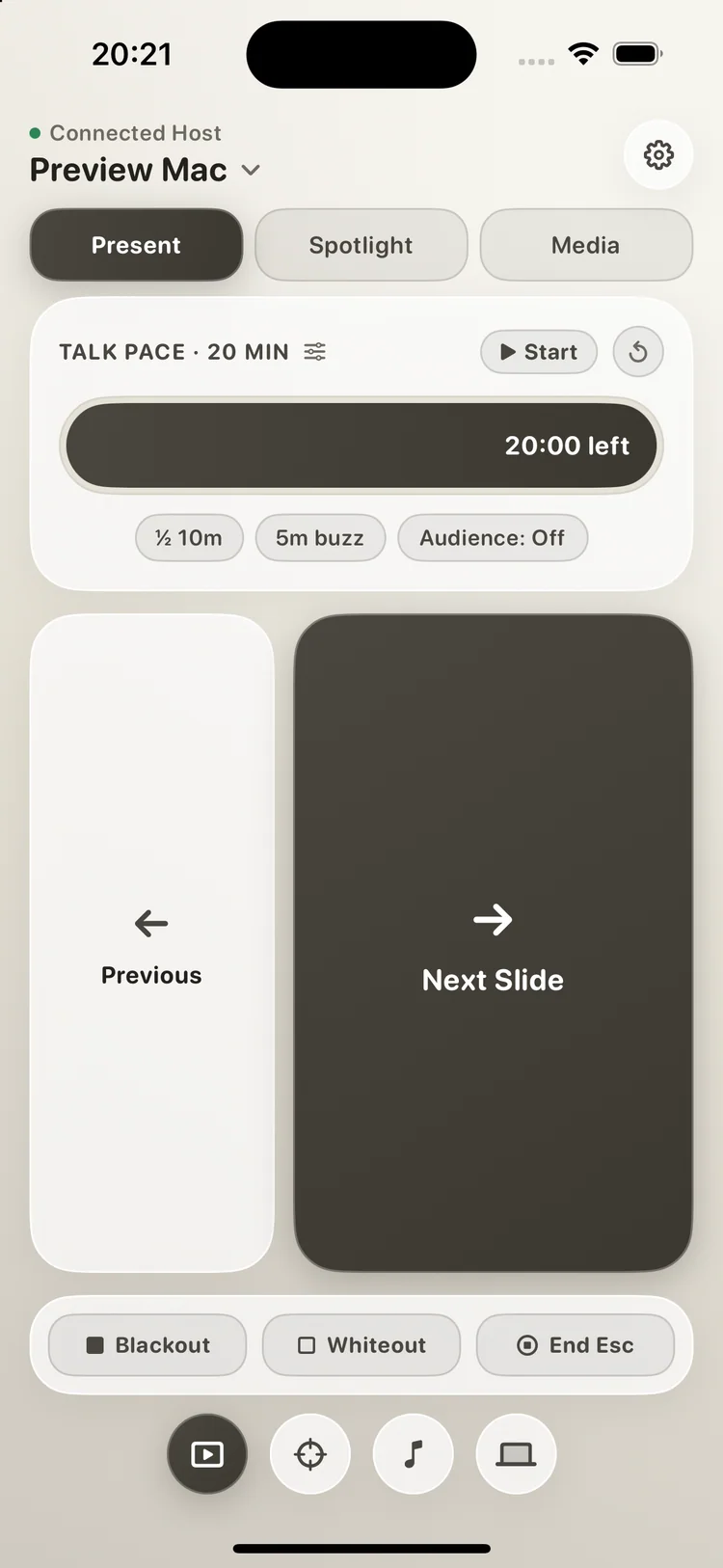
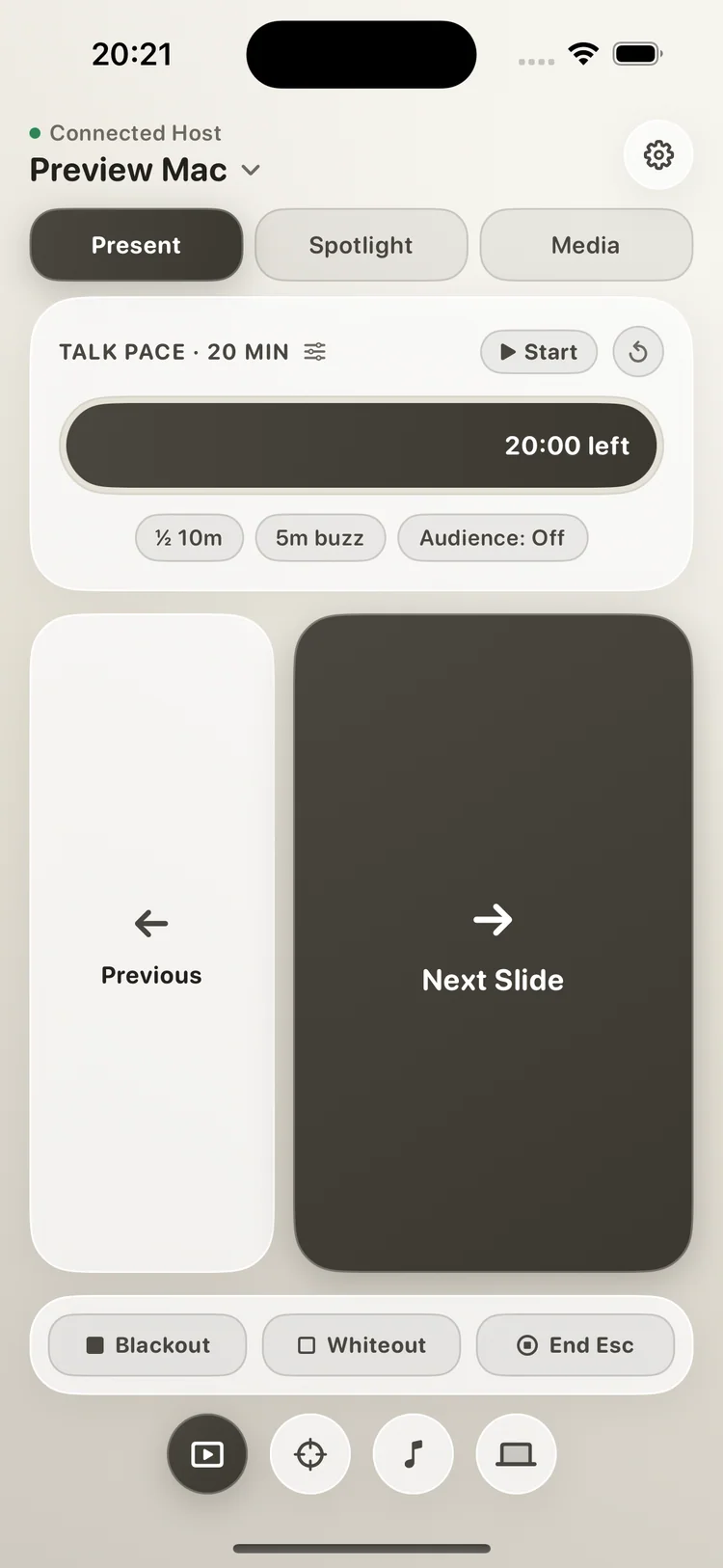
The screen divides into huge touch zones: tap the large right area for Next Slide (→) and the left area for Previous (←) without ever looking down.
Presentation Timer & Audience Stage Clock
Start your glanceable timer. When taking questions or breaks, tap Blank or Whiteout: Presento projects a giant digital countdown clock for the room.
Virtual Spotlight on Zoom & Teams
Switch to Spotlight mode to dim distractions and highlight slide diagrams. Unlike physical laser pointers, your spotlight is fully visible on Zoom, Teams, and recordings.
Download Companion Host for Your Computer
Run the lightweight host app on your Mac, Windows PC, or Linux laptop. No cloud account or internet connection required. Discovered automatically by your phone.
macOS
Apple Silicon & IntelNative helper with accessibility permissions for seamless slide control, Keynote, PowerPoint, and overlay timers.
Windows
64-bit InstallerRuns unobtrusively in your system tray. Delivers instantaneous PowerPoint, Canva, and browser presentation commands.
Linux
Debian / Ubuntu / MintStandalone background daemon with uinput integration for smooth LibreOffice Impress and PDF slide transitions.
Designed for muscle memory, not eye contact.
Hardware clickers get lost or run out of AAA batteries. Other remote apps force you to look at tiny on-screen buttons. Presento is engineered from the ground up for stage confidence.
Giant Ergonomic Slide Targets
Keep your eyes glued to the audience. The entire lower half of your screen splits into massive next and previous touch areas that register thumb taps reliably without glancing down.
- Haptic feedback confirms every slide change without looking.
- Audience Stage Clock: Projects crisp countdown timer when screen is blanked.
- Integrated timer with start, stop, and clean zero-out controls.
Test Presento right in your browser.
Tap the controls below to experience how fluidly Presento drives slides, operates presentation timers, and projects the stage countdown clock on blackout/whiteout.
Everything you need to deliver your best keynote.
Built with the same uncompromising attention to speed, aesthetics, and privacy that defines all Custavia software.
Audience Stage Clock on Blank
Need to pause for audience Q&A, a live demo, or a 10-minute workshop break? Tap Blank or Whiteout: Presento covers your presentation and projects a clean, high-contrast digital countdown clock on the room's main screen so everyone stays synchronized without exposing slide contents.
Zero Cloud Latency
Keystrokes travel directly across your local Wi-Fi or hotspot. No cloud intermediaries, zero telemetry hops, and sub-5ms response times.
Universal Deck Support
Works out of the box with Apple Keynote, Microsoft PowerPoint, Google Slides, Canva, Pitch, Prezi, PDF presentations, and media players.
Blackout & Whiteout
Instantly blank the auditorium projector to draw undivided attention back to you during key storytelling moments. Clean Custavia watermark confirms status.
100% Private, No Accounts
No account sign-ups, no tracking cookies, and no data harvesting. Your presentation slides, notes, and keystrokes stay strictly yours.
Try free for a month. Own it forever for $39.
No deceptive auto-renewals, no monthly micro-subscriptions, and no lock-in.
Full access to every feature from day one. No credit card required to start.
- 30 days completely free with zero commitment
- Single payment of $39 unlocks version 1 forever
- Includes 2 full years of active bug fixes & updates
- Use across all your personal iOS and Android devices
- Controls macOS, Windows 10/11, and Linux hosts
Receipts restore automatically via Apple ID or Google Play. No Custavia account needed.
Frequently Asked Questions
Clear answers to help you present smoothly and securely.